Evaluating KDP Interior To-Do Notebook Pages for Low Content Publishing
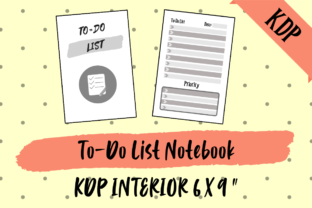
Selecting the right interior template is a foundational decision for anyone operating in the low or no-content book publishing space. The KDP Interior, to-Do Notebook Pages resource offers a structured solution designed specifically for Amazon Kindle Direct Publishing standards. This asset provides a pre-formatted lined interior optimized for productivity and organization niches. For publishers evaluating their next product line, understanding the technical specifications, file versatility, and strategic application of this 120-page template is essential for making an informed investment.
Understanding the Asset Specifications
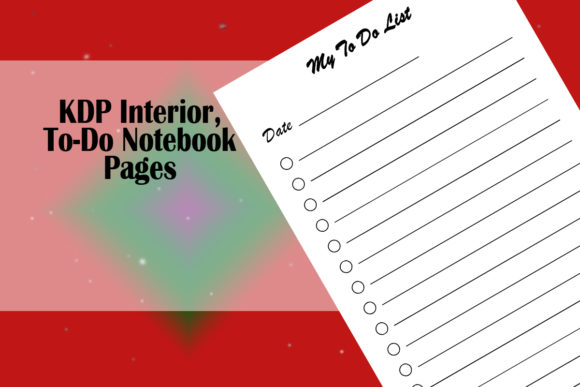
At its core, this resource is a digital template package containing lined to-do list pages configured for professional printing. The primary specification is the 6x9 inch trim size, which remains one of the most popular dimensions for journals and planners due to its portability and perceived value. Crucially, these files are set up with no bleed margins. In KDP terminology, "no bleed" means that all text and graphical elements remain within a safe zone away from the page edges. This setting simplifies the upload process and reduces the likelihood of rejection due to margin errors, making it particularly valuable for publishers who want to minimize technical friction.
The package includes 120 pages of content, but the utility extends beyond this specific page count. The included single right and left no-bleed pages serve as modular building blocks. These individual page files allow users to construct books ranging from 24 to 150 pages without needing to recreate layout grids or recalculate gutters. This modularity transforms the product from a static PDF into a flexible system for creating multiple variations of to-do notebooks, daily planners, or task trackers.
File Format Versatility and Workflow Integration
A significant factor in evaluating any KDP interior is compatibility with existing design workflows. This resource distinguishes itself by providing multiple file formats: PDF, PPT (PowerPoint), PNG, and SVG. Each format serves a distinct purpose in the publishing pipeline.
- PDF Files: These are print-ready documents intended for direct upload to KDP. They preserve exact positioning and font rendering, serving as the baseline for publishers who do not wish to modify the design.
- PPT Files: Microsoft PowerPoint is widely accessible and familiar to many low-content creators. Having editable source files in this format lowers the barrier to entry for customization, allowing users to adjust headers, add logos, or change fonts without specialized vector software.
- SVG Files: Scalable Vector Graphics are essential for users working in Adobe Illustrator, Inkscape, or Affinity Designer. Vectors ensure that lines remain crisp at any resolution and allow for deep structural editing of the to-do list layout.
- PNG Files: While less common for full interiors, high-resolution PNGs can be useful for creating mockups, marketing materials, or inserting specific page designs into other software like Canva.
This multi-format approach addresses a common pain point: vendor lock-in. Publishers are not forced to learn new software or purchase expensive subscriptions to utilize the asset effectively.
Strategic Benefits for Low Content Businesses
For entrepreneurs focused on efficiency, the primary benefit of using pre-made KDP Interior, to-Do Notebook Pages is time allocation. Designing a functional, aesthetically pleasing, and technically compliant to-do list from scratch requires significant hours. By utilizing a verified template, publishers can redirect energy toward keyword research, cover design, and niche analysis—activities that directly influence sales velocity.
Furthermore, the no-bleed configuration mitigates risk. Printing alignment issues are a frequent cause of poor customer reviews in the low-content category. When ink bleeds unexpectedly or margins are inconsistent, the user experience degrades. A professionally set up no-bleed interior ensures consistency across the entire print run, protecting the publisher's brand reputation and reducing return rates.
The inclusion of both single right and left pages also facilitates A/B testing. A publisher could create two versions of a to-do notebook—one with 80 pages and another with 120 pages—to test price elasticity and market preference without redesigning the interior structure.
Tradeoffs and Considerations
While the convenience is evident, objective evaluation requires acknowledging limitations. The most significant tradeoff is exclusivity. Because this is a commercially available template, other publishers may be using identical or similar interiors. In saturated niches, a generic interior can make differentiation difficult. Success with this asset often depends heavily on unique cover design and precise targeting of underserved sub-niches rather than the interior content alone.
Additionally, while the files are editable, they still possess a fixed underlying structure. Publishers looking to implement highly complex layouts, such as integrated habit trackers with circular progress bars or non-standard grid systems, may find the linear to-do format restrictive. The template excels at standard list-making functionality but may not support hybrid journal-planner concepts without extensive modification.
Licensing terms must also be reviewed carefully. Users should verify whether the license permits commercial use of the modified files and if there are restrictions on selling the templates themselves versus selling the compiled books. Understanding these legal boundaries prevents future account issues.
Situational Fit Analysis
Determining whether this resource aligns with specific business goals requires assessing current capabilities and objectives. This KDP Interior, to-Do Notebook Pages package is likely a strong fit for:
- New Publishers: Those learning KDP specifications who need a guaranteed-compliant starting point to understand margin safety zones and gutter requirements.
- High-Volume Publishers: Creators managing large portfolios who require standardized assets to maintain production speed.
- Niche Testers: Entrepreneurs validating demand in a new category who want to launch quickly with minimal upfront design investment.
- Non-Designers: Individuals with strong marketing skills but limited graphic design proficiency who need professional results via PowerPoint or simple vector edits.
Conversely, alternatives may be worth considering for:
- Premium Brand Builders: Publishers positioning their products at higher price points where unique, proprietary interior design is a key selling proposition.
- Specialized Tool Creators: Those developing niche-specific tools (e.g., medical logs, construction checklists) that require custom fields not present in a general to-do template.
- Experienced Designers: Professionals who already have established style guides and reusable master templates that better match their brand identity.
Making the Final Decision
Ultimately, the value of this interior resource lies in its function as a production accelerator rather than a creative endpoint. It solves technical compliance and layout challenges efficiently. When evaluating this asset, publishers should weigh the time saved against the need for differentiation. If the goal is to establish a baseline presence in the to-do notebook category or to expand an existing catalog with minimal overhead, the combination of no-bleed safety, multi-format accessibility, and modular page counts offers practical utility. However, if the strategy relies entirely on interior uniqueness as a competitive moat, this template should serve only as a structural reference rather than a final product. Aligning the tool choice with the broader business strategy ensures that the investment supports long-term publishing objectives rather than just short-term output volume.